
The short version
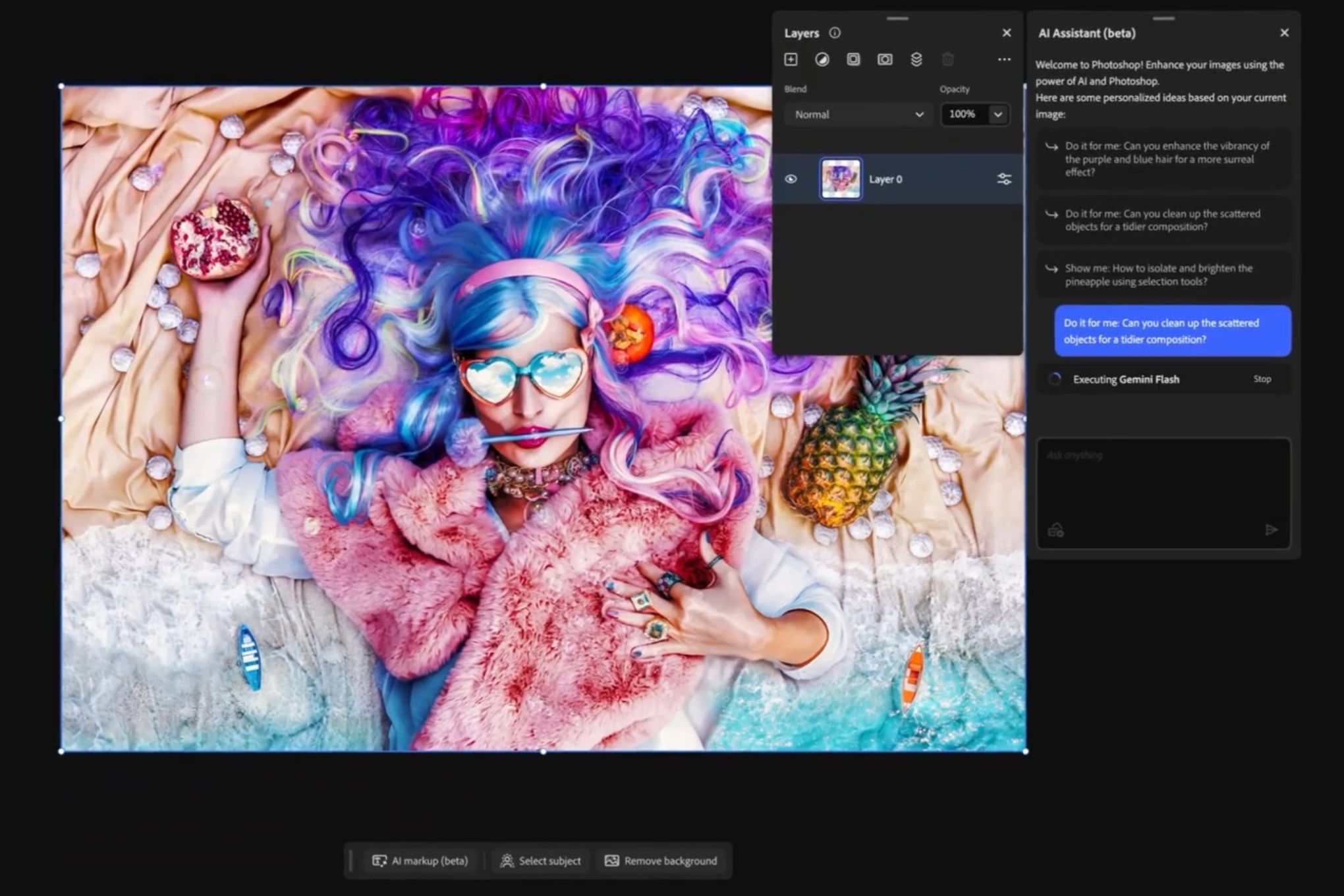
Adobe's AI Assistant is a new chatbot feature in Photoshop for web and mobile that lets you edit photos just by typing or speaking simple descriptions, like "remove the background" or "make the lighting brighter." It's now available in public beta, meaning anyone with access can try it without needing pro skills. This makes photo editing as easy as chatting with a friend, saving time for hobbyists, social media users, and casual creators.
What happened
Imagine you're editing a family vacation photo on your phone or browser, but you don't know all the fancy tools in Photoshop—like layers, masks, or color adjustments. Before, you'd have to hunt through menus or watch tutorials. Now, Adobe has rolled out an AI helper right inside Photoshop for web and mobile. It's like having a smart assistant who listens to your words and does the work for you.
This "AI Assistant" launched in public beta this week after a private test in October. You can tell it things like "remove distractions," "change the background," "fix the lighting," or "adjust colors," and it handles the edits automatically. Or, if you want to learn, it can guide you step by step. On mobile, you can even use your voice, perfect for editing on the go without typing. It's not in the full desktop Photoshop app yet, but Adobe hinted it's coming, along with similar tools for video editing in Premiere Pro.
Adobe is also teaming up with others: Soon, you can use Photoshop, Acrobat (for PDFs), and Express (a simpler design app) inside Microsoft's Copilot AI or even ChatGPT. No need to switch apps—just chat and edit. Think of it like telling Siri to fix your photo instead of fiddling with sliders yourself.
Why should you care?
Photo editing used to be for experts with expensive software and hours to spare. Now, AI makes it dead simple for everyday folks. If you post on Instagram, make family albums, design flyers for your side hustle, or tweak headshots for LinkedIn, this speeds everything up. No more frustration from clunky tools—your ideas turn into polished images in seconds. It democratizes creativity, so your vacation pics or business graphics look pro without the pro price tag (though you still need a Photoshop subscription).
For regular people, it means less time wasted learning software and more time enjoying results. Businesses might use it for quick marketing visuals, small creators for content, and families for fun memories. As AI gets baked into tools like this, everyday apps will feel smarter, handling boring tasks so you focus on the fun stuff.
What changes for you
- Easier editing anywhere: Use Photoshop on your phone or web browser—no powerful computer needed. Snap a pic, say "give it a vintage look but keep the taxis modern," and done.
- No skills required: Forget memorizing tools. Describe what you want in plain English, like "select the subject and create a mask" or "remove the background." It understands layers and objects automatically.
- Learning mode: Beginners get step-by-step tips, so you build skills over time without feeling lost.
- Integrations: Edit via Microsoft Copilot (for work folks with Microsoft 365) or ChatGPT—no Photoshop install required. Great if you're already chatting with AI daily.
- Beta access: If you have Photoshop web/mobile (part of Creative Cloud), try it now. Desktop version likely soon, but start with mobile for quick tests.
- Cost stays the same: It's included in your existing subscription—no extra fees mentioned. Free trials might apply for new users.
This shifts photo editing from "tech chore" to "quick chat," freeing up your day.
Frequently Asked Questions
### Is the Photoshop AI Assistant free to try?
It's in public beta and available to anyone with a Photoshop web or mobile subscription through Adobe Creative Cloud, which starts with a free trial. No extra cost for the AI feature itself, but you'll need an active plan (around $20/month for basics) after the trial. Check Adobe's site to sign up.
### Does it work on the full desktop Photoshop app?
Not yet—the chatbot is only in Photoshop for web and mobile right now. Adobe teased AI agents for the desktop version (and Premiere Pro) last year, so expect it soon. For now, use the web/mobile versions for on-the-go edits.
### How is this different from other AI image editors like those in ChatGPT?
Adobe's tool is built directly into Photoshop, so edits stay fully editable with pro layers and masks—you can tweak them later. ChatGPT integrations let you start edits there but jump to Photoshop for polish. It's more powerful for complex jobs, like handling multiple layers automatically.
### Can I use voice commands, and what languages does it support?
Yes, voice works in the mobile app for hands-free editing, like dictating changes while walking. It's English-only in beta so far, per Adobe's notes. Expect more languages as it improves.
### Is it safe to use my photos with this AI?
Edits happen in your Creative Cloud account, so your images stay private unless you share them. Adobe follows standard privacy rules, but review their terms for AI processing details. It's as secure as using Photoshop normally.
The bottom line
Adobe's new AI Assistant turns Photoshop from a pro-only powerhouse into an everyday chat buddy for photo edits, now in public beta on web and mobile with voice support and integrations like Microsoft Copilot. Regular people win big: Fix your selfies, swap backgrounds, or pro-up family pics without tutorials or frustration, saving hours weekly. If you edit images at all—social media, work docs, or hobbies—jump in via web/mobile to test it. This is creativity for everyone, not just designers, and it's only getting better as desktop support rolls out.
Sources
- The Verge: You can now ask Photoshop’s AI assistant to edit images for you
- Adobe Help: AI Assistant (English-only Beta) Photoshop Elements 2026
- Computerworld: Adobe AI assistants let you edit images in Photoshop and Express via prompts
- Digital Camera World: Agentic photo editing is here. ChatGPT can now edit images with Photoshop
- TechCrunch: Adobe launches AI assistants for Express and Photoshop
- ZDNET: Don't know Photoshop? Adobe's new AI tool can do image edits for you now - just ask