
Title:
Build Autonomous Context Compression into Your LangChain Agent in One Afternoon
Why this matters for builders
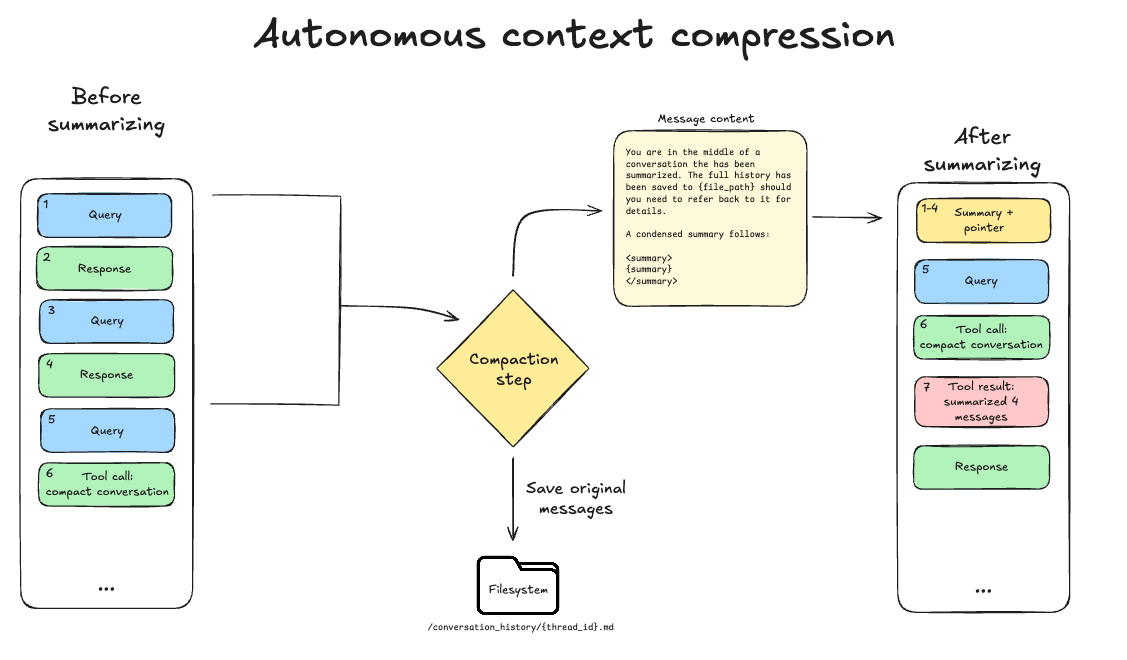
LangChain’s new Autonomous Context Compression tool lets your agent decide when and how to compress its own working memory, replacing older messages with concise summaries or “Knowledge” blocks while preserving accuracy. This removes the manual token-budget babysitting that breaks most long-running agents and unlocks reliable multi-hour or multi-day workflows.
The feature ships as a ready-to-use component in the Deep Agents SDK (Python) and CLI. Instead of hitting context limits and failing, your agent now proactively prunes history, keeps a persistent knowledge store, and continues with dramatically lower token usage (the LangChain team and related research show ~23% token reduction with no accuracy drop on SWE-bench style tasks).
When to use it
- Long-running research, coding, or customer-support agents that exceed 50k–200k tokens
- Any agent that must maintain memory across multiple sessions or days
- Projects where you want the model to manage its own context instead of writing brittle truncation logic
- SWE-bench style software-engineering agents or multi-step reasoning loops
- Production agents where cost and latency must stay predictable
The full process
1. Define the goal (15 minutes)
Write a one-paragraph spec before you touch any code.
Goal: Build a coding research agent that can work on a large codebase for 2–3 hours without hitting context limits.
The agent must autonomously decide when to compress conversation history into a persistent "Knowledge" block, prune raw messages, and continue with the compressed context.
Success metric: ≥20% token reduction while solving the same tasks it solved before compression.
Keep this spec visible. Every prompt you give the coding assistant should reference it.
2. Scaffold the project (10 minutes)
mkdir autonomous-compressor-agent && cd autonomous-compressor-agent
uv init
uv add langchain langgraph langchain-openai langchain-anthropic python-dotenv
Create the basic files:
agent.pyknowledge.py.env
3. Implement the compression loop
Prompt your AI coding assistant (Cursor, Windsurf, Claude, etc.) with this exact starter prompt:
You are an expert LangChain engineer.

We are building an autonomous agent that uses LangChain's new Autonomous Context Compression feature from the Deep Agents SDK.

Requirements:
- Use LangGraph for the agent loop
- Maintain a persistent "Knowledge" block as a separate state key
- At each turn, the agent must first decide whether compression is needed (look at token count or message length)
- If compression is triggered, call the compression tool that replaces older conversation history with a concise summary inside the Knowledge block
- Prune the raw messages after successful compression
- Keep a running token counter using tiktoken
- Use Claude 3.5 Sonnet or Haiku 4.5 as the model

Provide the complete `agent.py` with state schema, the compression node, and the conditional edge.
Use best practices from the LangChain Deep Agents SDK.
Paste the generated code into agent.py and iterate once or twice until the compression decision and pruning logic look clean.
Example skeleton (after first generation, you will refine it):
from langgraph.graph import StateGraph, END
from langchain_core.messages import HumanMessage, AIMessage, SystemMessage
from langchain_core.runnables import RunnableConfig
from typing import TypedDict, Annotated
import operator

class AgentState(TypedDict):
    messages: Annotated[list, operator.add]
    knowledge: str
    token_count: int
    compressed: bool

def should_compress(state: AgentState) -> str:
    if state["token_count"] > 80_000 or len(state["messages"]) > 35:
        return "compress"
    return "think"

def compress_context(state: AgentState, config: RunnableConfig):
    # The new autonomous compression tool from Deep Agents SDK
    compression_tool = config["tools"]["context_compressor"]

    result = compression_tool.invoke({
        "messages": state["messages"],
        "existing_knowledge": state.get("knowledge", "")
    })

    return {
        "messages": result["compressed_messages"],  # pruned list
        "knowledge": result["new_knowledge"],
        "token_count": result["new_token_count"],
        "compressed": True
    }
4. Add the Knowledge persistence layer
Create knowledge.py:
import json
from pathlib import Path

KNOWLEDGE_FILE = Path("agent_knowledge.json")

def load_knowledge() -> str:
    if KNOWLEDGE_FILE.exists():
        return json.loads(KNOWLEDGE_FILE.read_text())["knowledge"]
    return ""

def save_knowledge(knowledge: str):
    KNOWLEDGE_FILE.write_text(json.dumps({"knowledge": knowledge, "version": "1"}, indent=2))
Hook load_knowledge() at startup and save_knowledge() after every compression.
5. Validate it works
Run a controlled test:
- Start the agent on a deliberately long task (e.g. “Analyze this 40-file repository and implement feature X”).
- Watch the logs for compression events.
- After 30–40 turns, check:
- Token count dropped ≥20%
- The
knowledgeblock contains the important facts - The agent can still answer questions about earlier parts of the conversation
- Compare accuracy on a small benchmark task before and after compression.
Use this validation prompt for your coding assistant when something breaks:
The compression node is losing critical information.
Here is the before/after state and the current knowledge block.
Fix the compression prompt inside the tool call so that key decisions and code snippets are preserved.
6. Ship it safely
- Add a manual override: expose a
force_compresstool the user can call - Store knowledge in a real vector database (Chroma, Pinecone, or PGVector) instead of a JSON file once you outgrow the prototype
- Add cost monitoring: log token usage before and after each compression
- Version the knowledge schema so future agents can read old knowledge blocks
- Write a short README with the exact prompt that controls compression frequency
Pitfalls and guardrails
### What if the agent compresses too aggressively and forgets important details?
Add a strong system prompt to the compression tool: “You are an expert memory curator. Never discard concrete code snippets, exact requirements, or decisions that were explicitly confirmed by the user. Err on the side of keeping more information.” Test with aggressive vs conservative thresholds.
### What if compression becomes more expensive than the tokens it saves?
Monitor both compression cost and the subsequent response cost. Set a minimum token-saving threshold (e.g. must save at least 15k tokens to be worth compressing). The research shows that hierarchical or incremental compression avoids the linear growth problem mentioned in Factory’s evaluations.
### What if I’m not using LangGraph?
The Deep Agents SDK compression tool is usable in any LangChain chain via a simple tool call. You can still wrap it in a custom node or a RunnableLambda.
### What if the compressed output is hard to read?
That is expected with some compression methods (OpenAI’s /compact is opaque). LangChain’s version is designed to remain human-readable summaries inside the Knowledge block. Always keep the Knowledge section as plain text.
What to do next
- Replace the JSON knowledge file with a vector store + metadata
- Add multi-agent compression (one agent compresses while another continues working)
- Run the same task on SWE-bench Lite subset and measure exact token reduction
- A/B test different compression frequencies and prompts
- Package the agent as a reusable LangChain template for your team
Autonomous context compression is one of the highest-leverage features released for production agents this year. Builders who integrate it early will ship agents that can actually stay alive for hours or days instead of dying at the 128k token wall.
Sources
- LangChain Blog: Autonomous Context Compression (https://blog.langchain.com/autonomous-context-compression/)
- arXiv: Active Context Compression: Autonomous Memory Management in LLM Agents (https://arxiv.org/abs/2601.07190)
- Factory.ai research on context compression evaluation frameworks
(Word count: 942)