
The short version
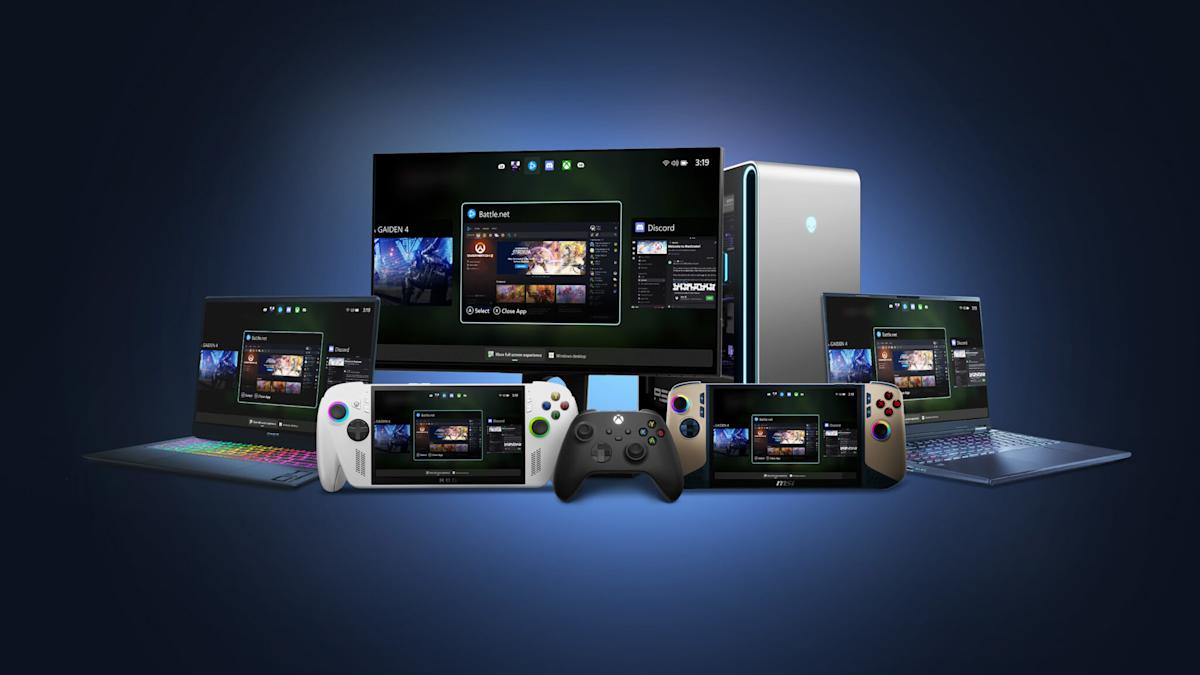
Xbox Mode is Microsoft's new full-screen gaming interface coming to all Windows 11 PCs in April, turning your laptop or desktop into something that feels like a real Xbox console. It's designed for game controllers, letting you easily browse your games, launch them, and switch between apps without touching a keyboard or mouse. This makes gaming on your PC couch-friendly and simpler, especially if you play with a controller like you would on a console.
What happened
Imagine you're used to playing games on your Xbox console—everything's big, simple, and controlled with a gamepad from the couch. Microsoft is bringing that same easy-to-use screen to regular Windows 11 computers, like your laptop or desktop PC. They first tested it on special gaming handheld devices called the ROG Ally last year, where it worked like a charm for controller users.
Now, at a big gaming developers' event called GDC, Microsoft announced it's rolling out this "Xbox Mode" to every Windows 11 PC starting in April. It's a full-screen setup that hides the usual cluttered Windows desktop and gives you a clean Xbox-style home screen. Think of it like switching your TV from a messy cable guide to Netflix's simple menu—everything's optimized for picking games and jumping right in.
It's not just a copy of Steam's old "Big Picture Mode" (which does something similar for Steam games). Xbox Mode works across your whole game library on Windows, including Xbox games you own through services like Game Pass. Microsoft is starting in select countries, so it might not hit everywhere at once. They'll share more details soon, especially about their next Xbox hardware, which sounds like a super-powered Windows PC in disguise.
On top of that, Microsoft dropped some tech upgrades for game makers. Things like "Advanced Shader Delivery" mean games won't stutter or hitch when you first play them—it's like pre-baking a cake so it's ready to eat right away, instead of mixing ingredients while you're starving. "DirectStorage" speeds up loading times on fast drives, and now it handles compression better, like zipping files to load quicker without losing quality. They're also teasing future AI smarts in their gaming tools to make graphics even better.
Why should you care?
If you game on a PC—even casually—this makes your setup way more fun and less frustrating. No more fumbling with a mouse and keyboard while lounging on the sofa; grab your Xbox controller, hit a button, and boom—you're in console land. It could pull more people into Xbox Game Pass (that Netflix-for-games service), meaning more games at a flat monthly price instead of buying each one.
For everyday folks, it's a nudge toward treating your PC like a gaming console hybrid. Families sharing a PC might love the kid-friendly controller navigation. And with Microsoft's hints at "Project Helix" (their next Xbox that's basically a Windows PC), your current PC could feel more "future-proof" for upcoming games and hardware.
What changes for you
- Easier couch gaming: Plug in an Xbox or compatible controller, launch Xbox Mode, and navigate your full game library with big icons and simple menus—no tiny desktop icons or keyboard shortcuts needed.
- Quick app switching: Jump between games, Netflix, or Discord without leaving the full-screen view, like flipping TV channels.
- Smoother new games: Those annoying pauses when a game loads new graphics for the first time? Mostly gone, thanks to the developer tools.
- Availability: Free update for Windows 11 users in April (phased rollout, select markets first). If you're on Windows 10, you'll need to upgrade (Windows 11 is free if your PC qualifies).
- No new hardware needed: Works on laptops, desktops, even older ones—just needs Windows 11. Game Pass subscribers get the most out of it with cloud streaming too.
- Potential downsides: It's controller-focused, so mouse/keyboard power users might stick to desktop mode. Early rollout means waiting if you're not in a supported area.
This blurs the line between PC and console gaming, so you might save money by ditching a separate Xbox if your PC handles games well.
Frequently Asked Questions
### When can I get Xbox Mode on my Windows 11 PC?
It rolls out to all Windows 11 devices in April, but it'll be phased—meaning not everyone at once, and starting in select countries. If you're in the Windows Insider program (a free tester group), you might try a preview now by also joining the Xbox Insider PC gaming preview. Check for updates in Settings > Windows Update.
### Is Xbox Mode free, and do I need an Xbox console?
Yes, it's completely free as a Windows 11 update—no Xbox console required. It runs directly on your PC or laptop. You'll need a compatible controller (like Xbox Wireless) for the best experience, but Microsoft sells those affordably.
### How is Xbox Mode different from Steam Big Picture Mode?
Both turn your PC into a controller-friendly console view, but Xbox Mode works across all your Windows games (not just Steam), integrates with Xbox Game Pass, and uses Microsoft's full Xbox UI. It's like Steam's mode but bigger-picture for the whole PC ecosystem, with extras like easy Game Bar access for screenshots and clips.
### Will this make my games load faster or run better?
Yes, indirectly—the new tools for developers (like Advanced Shader Delivery and improved DirectStorage) cut out stuttering and speed up loads on fast drives. You won't notice a change in old games, but new titles from Xbox stores will feel snappier, especially first-time plays.
### Does this mean the next Xbox is just a PC?
Microsoft's "Project Helix" next hardware will play both PC and console games, hinting it's a Windows-based gaming PC with Xbox branding. Xbox Mode prepares your current PC to feel similar, so you could game across devices seamlessly.
The bottom line
Xbox Mode is Microsoft's smart move to make Windows 11 PCs feel like effortless gaming consoles, launching in April for free. If you own a Windows PC and like controller gaming from the couch, this simplifies everything—no more desktop clutter, faster game starts, and easy access to your library. It's a win for casual gamers saving on hardware, Game Pass fans getting more value, and anyone tired of PC gaming's fiddly bits. Update your PC, grab a controller, and get ready for console vibes at home—your gaming nights just got easier.