
Building Reliable Agentic Workflows with Kasal: A Vibe Coding Guide
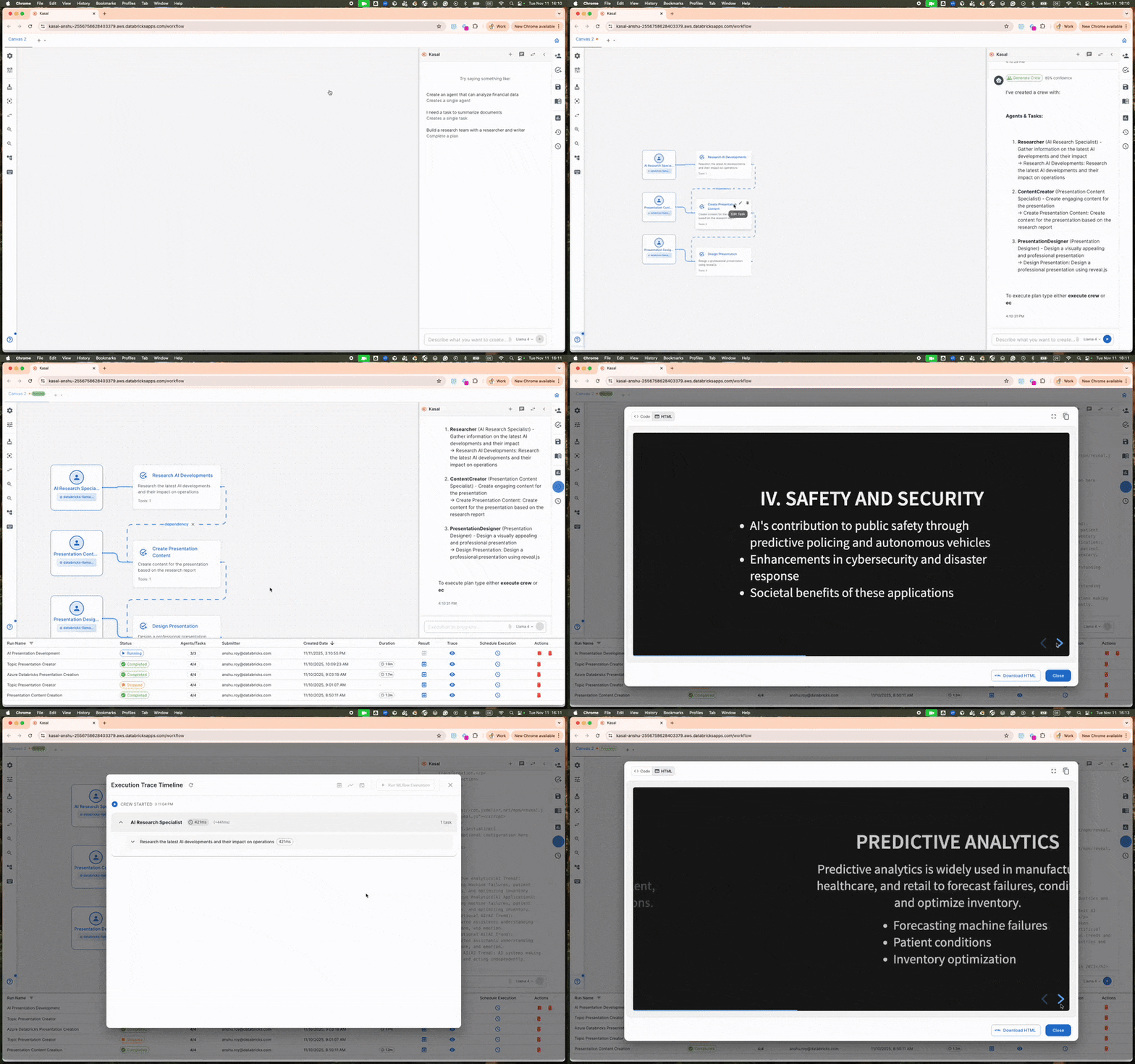
Kasal lets you visually orchestrate multi-agent AI systems using a low-code graph editor that runs natively on Databricks, turning complex agent coordination into an intuitive drag-and-drop experience while still exposing full code extensibility.
Databricks Labs just open-sourced Kasal, a visual orchestration layer purpose-built for agentic AI. It gives builders a clean canvas for connecting agents, tools, memory stores, and evaluation loops without drowning in YAML or brittle prompt chains. Because it lives inside the Databricks ecosystem, you get enterprise-grade data governance, Unity Catalog lineage, and scalable compute for free.
Why this matters for builders
Most agent frameworks force you to choose between “works in a notebook” and “actually ships to production.” Kasal removes that tradeoff. You design the high-level flow visually, attach your custom agents or LangChain/LlamaIndex components as nodes, and the runtime executes everything with Databricks’ security and observability baked in. This unlocks faster iteration for internal tools, RAG pipelines with critique agents, autonomous data-analysis crews, and customer-facing co-pilots that need auditability.
When to use Kasal
- You need more than one agent talking to each other with branching logic or human-in-the-loop
- You want visual debugging of agent hand-offs instead of scrolling through logs
- Your organization already runs on Databricks (Unity Catalog, Jobs, Model Serving, Vector Search)
- You must ship auditable, governed AI workflows to stakeholders or compliance teams
- You want to prototype fast but keep the path to production under 50 lines of glue code
The full process – From idea to shipped agentic workflow
1. Define the goal (30 minutes)
Start with a one-paragraph spec. Be brutally concrete.
Good example:
“Build a customer-support triage agent that (a) classifies incoming tickets using a fine-tuned Llama-3-70B, (b) routes urgent billing issues to a specialized refund agent that can call the billing API, (c) routes technical questions to a RAG agent over our knowledge base, and (d) loops in a human operator after two failed attempts. All actions must be logged to Unity Catalog.”
Write this spec in a Markdown file. This becomes your system prompt for the rest of the project.
2. Shape the prompt for your coding assistant
Feed your spec plus the following Kasal starter template to Cursor, Claude, or Databricks AI.
You are an expert Databricks + Kasal engineer.

Project: [paste your one-paragraph spec]

Requirements:
- Use Kasal visual graph as the main orchestration layer
- All agents must be implemented as Python classes extending the Kasal BaseAgent
- Use Unity Catalog for memory and trace logging
- Include at least one human-in-the-loop node
- Add evaluation loop that measures resolution time and escalation rate
- Keep every node under 80 lines of code

First, output the exact folder structure we should use.
Then give me the kasal.json graph definition and the Python files for each node.
3. Scaffold the project
Clone the official starter:
git clone https://github.com/databrickslabs/kasal.git
cd kasal
cp -r examples/customer-support-triage my-workflow
Typical structure you’ll end up with:
my-workflow/
├── kasal.json                 # visual graph definition (auto-generated + edited)
├── agents/
│   ├── classifier_agent.py
│   ├── billing_refund_agent.py
│   ├── rag_technical_agent.py
│   └── human_escalation.py
├── tools/
│   └── billing_api_tool.py
├── memory/
│   └── unity_catalog_store.py
├── eval/
│   └── metrics.py
└── run.py                     # local + Databricks Jobs entrypoint
4. Implement node by node
Kasal nodes are simple. Here’s a minimal but production-ready agent template:
from kasal import BaseAgent, NodeOutput
from databricks.sdk import WorkspaceClient

class TicketClassifier(BaseAgent):
    def __init__(self):
        self.w = WorkspaceClient()  # for Unity Catalog access

    async def run(self, state: dict) -> NodeOutput:
        ticket_text = state["ticket_text"]

        # Call your serving endpoint or foundation model API
        classification = await self.call_model(
            prompt=self.system_prompt,
            user_message=ticket_text,
            model="databricks-meta-llama-3-1-70b-instruct"
        )

        return NodeOutput(
            next_node=classification["route"],
            state_update={
                "category": classification["category"],
                "confidence": classification["confidence"],
                "trace_id": self.w.current_trace_id
            }
        )
Repeat for each specialized agent. Keep business logic in tools, not inside the agent.
5. Validate early and often
Run these checks every time you add a node:
- Local smoke test:
python run.py --mode local - Graph validation: Kasal’s built-in validator catches missing connections
- Trace inspection: Open the run in Databricks UI → see every agent hand-off and token usage
- Unit tests for tools (never trust an agent with unaudited tool calls)
- Synthetic eval loop: generate 50 test tickets and measure escalation rate < 12%
Add a simple eval script:
# eval/metrics.py
from kasal.evaluation import run_eval_suite

results = run_eval_suite(
    workflow="my-workflow/kasal.json",
    testset="eval/test_tickets.jsonl",
    metrics=["resolution_time", "escalation_rate", "correct_route"]
)
print(results)
6. Ship safely to production
- Commit the
kasal.jsonand all Python files. - Create a Databricks Job that points to
run.py. - Enable table access control so only the service principal running the job can read the memory tables.
- Turn on audit logging to Unity Catalog.
- Start with manual human-in-the-loop on all escalations.
- Gradually increase automation once weekly eval passes your threshold.
Pitfalls and guardrails
### What if the visual graph gets too big?
Keep the top-level graph under 12 nodes. Extract sub-workflows into their own Kasal graphs and call them as composite nodes. This is explicitly supported.
### What if my agents hallucinate tool parameters?
Never let agents build raw SQL or API calls. Wrap every dangerous tool behind a Pydantic-validated function and let the agent only pick the tool name + structured arguments.
### What if the visual editor and code get out of sync?
Treat kasal.json as source of truth for topology but keep agent implementation in Python. Run kasal validate in CI to catch drift.
### What if I need to support Windows or specific Linux distros?
Kasal now officially supports Windows and Ubuntu. For other environments, use the official Docker image provided in the repo.
### What if the project is a research prototype, not production?
Still use Kasal. The visual layer dramatically reduces the time to throw away bad ideas. Delete the graph and start over in < 10 minutes.
What to do next
- Pick one real internal workflow that currently lives in a messy notebook
- Spend one hour writing the one-paragraph spec
- Scaffold with the template above
- Ship a v0.1 that works end-to-end with human fallback
- Measure one metric (escalation rate or average resolution time) before declaring victory
Once you have one workflow in production, duplicating the pattern for the next use case takes roughly 1/3 the time.
Kasal is still young (first public release September 2025), but the combination of visual orchestration + Databricks enterprise backbone makes it one of the most practical ways to ship reliable agentic systems today.
Sources
- Original announcement: https://www.databricks.com/blog/introducing-kasal
- Official repository: https://github.com/databrickslabs/kasal
- LinkedIn community posts confirming Windows + Ubuntu support (Sep 2025)
- Databricks Labs issue tracker for current enhancements
(Word count: 942)